How to Use AI Virtual Headshots for Business in 2025
How to Use AI Virtual Headshots for Business in 2025
If your LinkedIn photo is three jobs old, your “About” page still shows a blurry crop from a wedding, and your team collage looks like a yearbook from five different decades, you’re not alone. Getting consistent, professional business photos used to mean expensive photographers, awkward studio sessions, and long turnaround times.
AI virtual headshots change that, if you use them correctly.
In this guide, you’ll learn a practical, end‑to‑end workflow for planning, generating, and deploying an AI virtual headshot across your website, LinkedIn, pitch decks, email signatures, and team pages—using tools like HeadshotVIP and a few alternatives. The goal: studio‑quality, on‑brand photos everywhere your business shows up.

What Is an AI Virtual Headshot (and Why It Matters for Business)?
An AI virtual headshot is a professional portrait generated by an AI model from your existing selfies or casual photos. Instead of a photographer taking new images, software:
- Analyzes your face (shape, features, expression)
- Rebuilds lighting, background, and clothing in a business‑ready style
- Outputs AI‑generated headshots you can use like traditional photos
Done well, an AI professional headshot gives you:
- A clean, consistent look for every business touchpoint
- Faster turnaround (minutes instead of days or weeks)
- Much lower cost than in‑person corporate shoots
- Flexibility to match different brand tones (formal, startup, creative, executive)
Most content you’ll find online focuses on “how to get an AI LinkedIn headshot.” That’s useful, but limited. In 2025, you probably need the same person to look coherent across:
- LinkedIn + resume
- Corporate site “About” page and team bios
- Sales decks and investor presentations
- Speaker bios, podcast guest pages
- Email signatures, Zoom profiles, Slack avatars
The rest of this article walks through a workflow, not just a single upload‑and‑download trick.
Step 1: Plan Your Business Headshot System (Before You Touch Any AI)
The biggest mistake with AI headshots is treating them like one‑off images instead of part of your brand system. Take 10–15 minutes to plan.
1. Define Your “Headshot Roles”
List where you’ll use virtual business headshots and how “formal” each needs to be:
- LinkedIn & Resume – clean, neutral background, business or smart‑casual outfit
- Company Website / About Page – consistent backdrop and framing across the team
- Pitch Decks & Sales Collateral – slightly more polished and authoritative
- Email Signature – tight crop, good contrast at small size
- Social & Personal Brand (X, Instagram, personal site) – more relaxed, creative variants
This tells you how many styles you actually need from your AI generator.
2. Choose Visual Direction for Each Use Case
For each “role”, decide:
Background
- LinkedIn: light grey, subtle gradient, or simple office blur
- Website: same backdrop for everyone (e.g., soft office, brand color gradient)
- Pitch deck: slightly more contrast and depth for projection on screens
Attire
- Corporate: blazer/jacket, collared shirt, muted colors
- Startup / creative: smart casual, T‑shirt under blazer, or simple knits
- Executive: darker suit tones, minimal accessories
Expression & Framing
- Neutral / slight smile, eye contact, shoulders visible
- No dramatic angles—head‑and‑shoulders works almost everywhere
Write this down once. You’ll use it as your style brief when generating AI virtual headshots.
3. Collect Your Source Photos Correctly
AI tools (including HeadshotVIP) are only as good as what you feed them. Aim for:
- 8–20 photos, mix of:
- Front‑facing, good lighting
- A few 3/4 angles
- Different outfits, but no sunglasses, hats, heavy filters
- Resolution: clear enough to see eye detail (modern phone cameras are fine)
- Lighting: natural window light or soft indoor light; avoid harsh shadows or backlight
This directly impacts how realistic your AI‑generated headshot will look.
Step 2: Generate AI Virtual Headshots with HeadshotVIP (Recommended)
HeadshotVIP is built specifically for business‑focused AI headshots, not just fun avatars. It works well when you want consistent looks across LinkedIn, resumes, websites, and team pages.
Method 1: Using HeadshotVIP (Recommended)
Use Case:
Professionals, founders, freelancers, and teams who want fast, consistent AI virtual headshots for all business profiles and materials—without complex editing.
Operation Steps (HeadshotVIP Workflow)
Go to HeadshotVIP
Visit the official site: https://headshot.vip
You can use it directly in your browser—no heavy software install required.Create an account and pick a plan
- Starter: great for individuals needing 1–2 solid headshot styles
- Professional: more styles + higher‑resolution outputs for print and decks
- Team / Business: for companies standardizing photos across the whole team
Upload your selfies
- Follow the on‑screen guidelines for:
- Number of images (usually 8–20)
- Lighting and angles
- Avoid group shots or heavily filtered images—these reduce accuracy.
- Follow the on‑screen guidelines for:
Choose your business styles
HeadshotVIP offers multiple business‑oriented presets, such as:- LinkedIn / Corporate
- Startup / Founder
- Executive / Board
- Creative Professional
Pick styles that match the visual direction you defined in Step 1.
For teams, choose a shared style so every headshot looks like part of the same “photoshoot.”Generate your AI virtual headshots
- Confirm your choices and start generation
- Wait a short time while the AI:
- Learns your facial identity
- Reconstructs lighting and background
- Produces multiple variations per style
Review, select, and download
- Favorite 1–3 images per role:
- 1 for LinkedIn & resume
- 1 for website / team page
- 1 for decks and speaker bios
- Download in high resolution (HeadshotVIP optimizes for LinkedIn, CVs, and web use)
- Favorite 1–3 images per role:
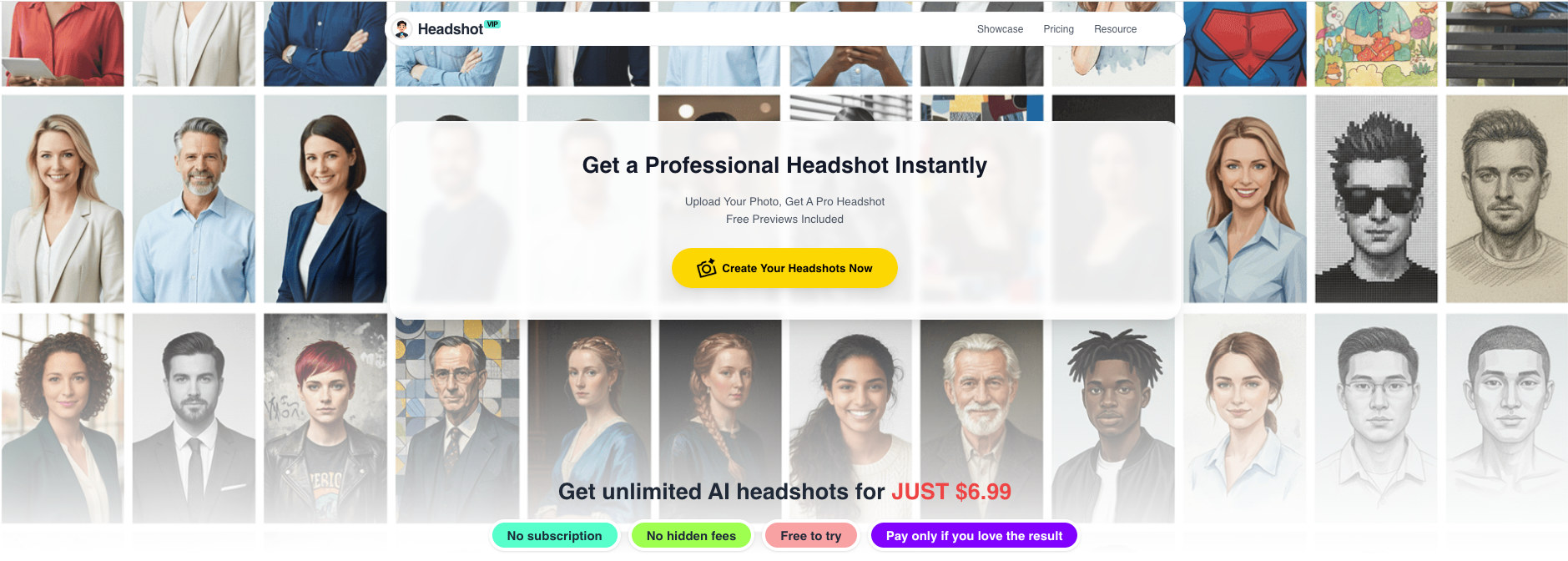
Advantages of HeadshotVIP for Business Use
✅ Business‑first styles
Tuned specifically for LinkedIn, corporate, startup, executive, and creative roles—not cosplay or novelty filters.✅ Multi‑channel consistency
You can generate different looks that still clearly feel like “you” thanks to advanced identity consistency modeling.✅ Team‑friendly
Style‑consistent batch generation helps entire teams get unified virtual business headshots without booking a studio.✅ High‑resolution, platform‑ready
Outputs are optimized for LinkedIn, resumes, About pages, and presentations, so you don’t have to guess crop ratios or DPI.✅ Privacy‑focused
HeadshotVIP is built with privacy‑first image handling. Your uploaded selfies and generated photos aren’t repurposed to train random models or sold to third parties.✅ Simple workflow
Clear upload → choose style → generate → download flow with minimal manual fiddling. You don’t need to be a designer.
Limitations to keep in mind (honest view):
- Results still depend heavily on:
- Quality and lighting of the photos you upload
- The variety of angles you provide
- Fine‑grained manual retouching (e.g., micro changes in pose or hand placement) is more limited than traditional photography
Method 2: Alternative AI Headshot Generators (Canva, Aragon, HeadshotPro, etc.)
Several well‑known tools also offer AI professional headshot features. They’re solid options, especially if you already use them—but they come with trade‑offs.
1. Canva AI Headshot Generator
Best for:
Quick, free or low‑cost upgrades from selfies when you’re already editing in Canva.
How it generally works (based on their public flow):
- Open a Canva design (or blank canvas).
- Go to Apps → search for the profile photo / AI headshot app.
- Upload a selfie, pick gender identity, and let Canva generate variants.
- Refine using Canva tools (background remover, color correction, filters).
- Export for use on LinkedIn or your website.
Pros:
- Integrated with Canva’s huge design ecosystem
- Easy to add text, frames, and layouts
- Free credits available (good for testing)
Cons (for business workflows):
- Styles are more general; less focused on nuanced business personas
- Consistency across a full team can be harder to control
- Quality and realism may vary compared with dedicated headshot engines
2. Aragon / HeadshotPro and similar “AI Photoshoot” services
Best for:
Individuals or teams wanting big batches of options and don’t mind paying more for volume.
Typical pattern (from their marketing):
- Upload 6–20 selfies.
- Choose attire and backgrounds.
- AI builds a custom model and generates 40–100+ headshots.
- You pick your favorites and optionally use extra editing tools (background changer, clothing swap, etc.).
Pros:
- Large volume of results to choose from
- Many backgrounds and outfits, including niche themes
- Extra editing tools beyond business use (dating, glamour, etc.)
Cons (where HeadshotVIP shines instead):
- Can feel overwhelming: dozens or hundreds of options to sift through
- Some styles skew more toward “wow” factor than conservative corporate use
- Pricing often assumes you want the maximum variety, not a lean, business‑focused set
- Workflows and branding often emphasize novelty use cases alongside professional ones
Step 3: Turn Your AI Virtual Headshot into a Complete Business Workflow
Generating an AI professional headshot is only half the job. The real value comes when you systematically roll it out across your business touchpoints.
1. Optimize Your Headshot for LinkedIn & Resume
- Use a square crop with your face centered and filling ~60–70% of the frame.
- Check it at small sizes (mobile app, search results) to ensure:
- Eyes are visible
- Background isn’t too busy
- Contrast is high enough
If you want deeper specifics, see:
Best AI Professional Headshot Generator for LinkedIn 2025
Resume / CV
- Use a slightly larger, high‑resolution version of the same image.
- Avoid colored borders or heavy filters; keep it neutral and ATS‑friendly.
- Save as JPG or PNG with a reasonable file size (~200–400 KB is often enough).
2. Standardize Headshots on Your Website and Team Pages
For founders and companies, your virtual business headshot should look like part of a set:
- Use identical framing (head‑and‑shoulders) and similar expression across the team.
- Pick 1–2 backgrounds for everyone—e.g., office blur and brand‑color gradient.
- Ensure output resolution is high enough for retina displays (usually at least 1200px wide).
HeadshotVIP’s style‑consistent batch generation is particularly useful here: you can generate an entire team’s headshots in a single visual language.
3. Add Headshots to Pitch Decks, Sales Docs, and Speaker Bios
In 2025, people expect to see real faces in:
- “Founding team” and “Leadership” slides
- Sales proposals and account plans
- Webinar promo pages and conference speaker lists
Tips:
- Use slightly more polished versions (richer lighting, subtle depth of field).
- Keep the same image across decks, your website, and LinkedIn to strengthen recognition.
- Avoid using playful/experimental AI styles here—stick with business‑appropriate looks.
For more ideas on using visuals in business storytelling, you can cross‑reference design resources like Nielsen Norman Group’s articles on visual hierarchy.
4. Build Email Signatures and Profile Images Automatically
Your headshot also belongs in:
- Email signature blocks
- Zoom / Teams / Google Meet avatars
- Slack / Teams profile photos
- Internal directory or org chart tools
Here’s a fast way to systematize this:
Create two exports of your chosen AI virtual headshot:
- Full‑size: for about pages and decks
- Small, tight crop: optimized for 100×100–200×200px use
Use an email signature generator (some AI headshot tools, including competitors, have this built in; for now you can use any general email signature builder) and plug in:
- Your small headshot
- Name, title, company, key links
Update all your accounts in one sitting:
- Email clients (Gmail/Outlook)
- Video meeting tools
- Internal chat / collaboration platforms
Step 4: Keep Your AI Virtual Headshot Trustworthy and On‑Brand
AI can go weird if you’re not careful. Here’s how to keep your AI‑generated headshot looking like you—and appropriate for business.
1. Make It Believably You
- Avoid extreme retouching that changes:
- Face shape
- Skin tone
- Eye color
- Minimal, natural enhancements are fine (smoother skin, nicer lighting), but you should still look like yourself in a meeting room.
Many recruiters have publicly stated that they prefer well‑done AI headshots over obviously bad selfies, but misrepresentation is still a red flag.
2. Respect Privacy and Data Security
Before you upload any selfies:
- Read the tool’s privacy policy to confirm:
- Whether they reuse your images to train other models
- How long they store your photos
- How you can delete your data
HeadshotVIP focuses on privacy‑first processing, aligning with what many businesses now require for vendor adoption.
If you’re a team lead or HR, treat headshot tools like any other SaaS vendor:
- Ask for basic security details
- Ensure they’re not reselling or leaking employee images
3. Align With DEI and Brand Guidelines
For companies:
Ensure AI does not:
- Lighten or darken skin in a way that erases identity
- Change hair texture or cultural dress unless the employee requests it
- Over‑idealize features to a single “beauty standard”
Give team members a say:
- Let them choose between 2–3 approved backgrounds and outfits
- Allow edits or re‑runs if they feel misrepresented
This isn’t just ethical; it reduces the risk of public backlash if your “AI virtual headshots” look like everyone’s been run through the same unrealistic filter.
Step 5: Choosing the Right AI Virtual Headshot Tool for Your Use Case
Here’s a quick comparison framework using three common solution types versus HeadshotVIP.
Comparison: General AI Photo Editors vs AI Headshot “Suites” vs HeadshotVIP
| Feature / Need | General Editor (e.g., Canva) | AI Headshot Suites (e.g., Aragon, HeadshotPro) | HeadshotVIP |
|---|---|---|---|
| Focus on business‑ready looks | Medium | High | High |
| Volume (40–100+ images) | Low–Medium | High | Medium–High |
| Multi‑channel workflow (web, decks, email) | Manual setup | Partial | Guided by business styles |
| Team consistency (same style for everyone) | Difficult | Good | Strong; style‑consistent batch |
| Learning curve for non‑designers | Easy | Medium | Easy |
| Extra fun / non‑business styles | Many (filters, effects) | Many (dating, glamour, etc.) | Focused on professional use |
| Privacy & identity control | Varies | Varies | Privacy‑first positioning |
| Best fit | Solos needing quick upgrade inside Canva | Users wanting lots of looks for many contexts | Individuals & teams who want a clean, business‑only pipeline |
In short:
- If you mainly design in Canva and just want a slightly better selfie, Canva’s built‑in tools are fine.
- If you want maximum variety and don’t mind exploring lots of options, the big suites are strong contenders.
- If you want a clean, business‑only workflow—especially for teams—HeadshotVIP is designed precisely for that.
Pro Tips for Getting the Best AI Virtual Headshot Results
These small tweaks often make the difference between “AI‑ish” and “wow, that looks like a real photoshoot.”
Prioritize lighting over everything else in your source photos
Stand facing a window, avoid overhead spotlights, and don’t shoot in a dark room. Good lighting helps the AI model understand your facial structure accurately.Use a variety of angles but keep expressions neutral
Include a few slight angles (left/right) so the AI doesn’t get locked into a single pose, but avoid exaggerated expressions that you wouldn’t use in a professional context.Pick fewer, stronger styles—not every preset
Especially for business. Two or three well‑chosen styles (e.g., LinkedIn classic, startup casual, executive) beat ten random variations you’ll never use.Test at actual usage sizes
Before finalizing a headshot, look at it:- As a tiny circle in a LinkedIn comment
- On your About page next to a block of text
- In a slide deck on a projector
Some images that look great full‑screen fall apart when shrunk to 80×80px.
Schedule a yearly “headshot refresh”
Put a reminder in your calendar (or HR system for teams). Update your AI professional headshot annually or when you significantly change your look (hair, glasses, facial hair).
Frequently Asked Questions About AI Virtual Headshots
Q1: Are AI virtual headshots acceptable on LinkedIn and corporate websites?
A: Yes, as long as they look realistic and accurately represent you. Many recruiters now prefer clean, well‑lit photos—AI‑generated or not—over grainy selfies. The key is authenticity: your AI professional headshot should match how you look in a real‑world meeting.
Q2: How many photos should I upload to get a good AI‑generated headshot?
A: Most tools work best with 8–20 photos. Include a mix of angles and outfits, but keep them all clear, well‑lit, and unobstructed (no sunglasses, hats, or heavy filters). Quality matters more than sheer quantity.
Q3: Can I use one AI virtual headshot everywhere?
A: You can, but it’s often better to have 2–3 coordinated variations: one neutral LinkedIn/resume version, one slightly more polished for decks and speaker bios, and one more relaxed for personal branding or social. HeadshotVIP makes it easy to generate those within the same identity and style family.
Summary
AI virtual headshots in 2025 aren’t just a LinkedIn hack—they’re a practical way to standardize your professional image across everywhere your business shows up. The key is to treat them as part of a workflow:
- Plan your visual roles and styles (LinkedIn, website, decks, email, social).
- Feed your AI tool high‑quality, well‑lit selfies.
- Use a business‑oriented generator like HeadshotVIP to create consistent, realistic AI professional headshots.
- Systematically roll them out across profiles, websites, signatures, and internal tools.
- Revisit yearly and keep privacy, authenticity, and DEI in mind.
Used this way, AI headshots stop being a novelty and become part of your professional infrastructure.
Try HeadshotVIP Now:
- Starter: $6.99 – ideal for individuals updating LinkedIn and resumes
- Professional: $9.99 – more styles and higher‑resolution outputs for websites and decks
Related Articles
- ai-professional-headshot-branding-guide-2025
- ai-headshot-generation-privacy-protection-guide-2025
- create-ai-virtual-headshots-for-business-profiles-2025
Current Date: 2026-01-21