Best AI professional headshot tools for business in 2025
Best AI professional headshot tools for business in 2025
If your LinkedIn photo is still a blurry crop from a group picture, you’re not alone. In-office photo days are rare, photographers are expensive, and most of us only have selfies on our phones. Yet your headshot is often the first thing hiring managers, clients, and investors see.
The good news: AI professional headshot tools in 2025 are finally good enough to replace many traditional studio shoots for business use — if you pick the right one and feed it good photos.
This guide compares the best AI headshot generators for business profiles, explains when each makes sense, and shows where HeadshotVIP stands out for LinkedIn-ready, resume-friendly results.

What to look for in an AI professional headshot tool
Before you upload your selfies anywhere, it helps to know what actually matters for business headshots. The top tools (like Canva’s headshot generator, Aragon AI, and dedicated reviewers’ picks) tend to emphasize the same core points:
1. Realism and likeness
For business use, the image has to:
- Actually look like you (no “AI face” or plastic skin)
- Keep your facial features consistent across images
- Handle details like teeth, eyes, and hair without warping
Many free or low‑quality generators fall apart here. They create pretty images, but not trustworthy ones. For LinkedIn and company bios, realism beats “Hollywood filter” every time.
2. Business-appropriate styles
You don’t just need “a good photo” — you need the right photo for the context:
- Corporate / executive: Neutral background, blazer or suit, clean lighting
- LinkedIn / general professional: Smart-casual, soft background blur
- Startup / creative: Brighter colors, looser framing, more personality
Good AI headshot tools give you business‑focused presets and outfits, not just generic AI art styles.
3. Output quality and formats
Look for:
- High resolution suitable for LinkedIn (400×400+), resumes, and website bios
- Crops that work well in circles and squares (LinkedIn, Slack, Notion, etc.)
- Clean backgrounds that still look natural (not obviously AI-rendered)
4. Privacy and data handling
You’re uploading your face and often multiple personal photos. Serious tools are:
- Clear about how your photos are stored and deleted
- Up‑front about whether they use your images for model training
- Using basic security practices (encryption, limited access, etc.)
Aragon, for example, highlights SOC 2 compliance and promises not to sell your data. That’s the level of transparency you want to see.
5. Pricing that matches your use case
You don’t need to spend $50 if you only want one clean LinkedIn photo. But if you’re rebranding your portfolio, or a company wants consistent team headshots, bulk packages make more sense.
In general:
- Free / freemium tools (e.g., Canva) are good for quick tests
- Mid‑range paid tools (Aragon, HeadshotVIP, etc.) are ideal when you care about realism and business use
- Team plans are worth it if you want consistent photos across your company
The best AI professional headshot tools for business in 2025
Below are the tools that consistently show up in real‑world tests and user reviews, plus where each one fits best.
1. HeadshotVIP – Best for focused business & LinkedIn headshots (Recommended)
Best for: Job seekers, professionals, founders, and teams who want straightforward, business‑first headshots without learning a complex editor.
HeadshotVIP is built specifically around professional, business‑ready portraits. Instead of trying to be a general AI playground, it focuses on a few things and does them well:
- Turning everyday selfies into LinkedIn-ready headshots
- Providing multiple business styles (corporate, startup, executive, creative)
- Creating consistent looks for teams and company directories
How to create an AI professional headshot with HeadshotVIP
Use Case: You’re updating your LinkedIn, CV, and company bio, and you want a realistic, professional headshot without booking a photographer.
Step 1: Prepare a few good selfies
For best results:
- Choose 5–10 clear photos of yourself
- Make sure your face is fully visible (no sunglasses, no heavy filters)
- Use different angles and expressions, but keep them natural
- Avoid harsh backlighting or very dark rooms
Step 2: Go to HeadshotVIP
Visit HeadshotVIP in your browser. No complex setup or design skills needed.
Step 3: Select your business style
Pick from HeadshotVIP’s business‑focused presets, such as:
- LinkedIn Classic – neutral background, soft light, smart-casual outfit
- Corporate Executive – darker suits, more formal framing
- Startup Founder – brighter, modern backgrounds, smart-casual clothing
- Creative Professional – subtle personality while staying business‑appropriate
You can choose one style or generate across several.
Step 4: Upload your photos
- Upload your prepared selfies
- Confirm your gender or style preferences if prompted
- Review and confirm that all images are clear and correctly oriented
HeadshotVIP’s identity model uses these inputs to lock in your facial features so the AI doesn’t “drift” into a different person.
Step 5: Let the AI generate your headshots
HeadshotVIP:
- Rebuilds the lighting and background to look like a studio shoot
- Adjusts skin and color without turning you into a plastic avatar
- Keeps facial structure and hair recognizable
You’ll typically get a set of high‑resolution options optimized for platforms like LinkedIn and resumes.
Step 6: Download your favorites
You can:
- Download images in high resolution
- Use optimized crops that work for LinkedIn, CVs, and About pages
- Reuse them across portfolios, email signatures, and social bios
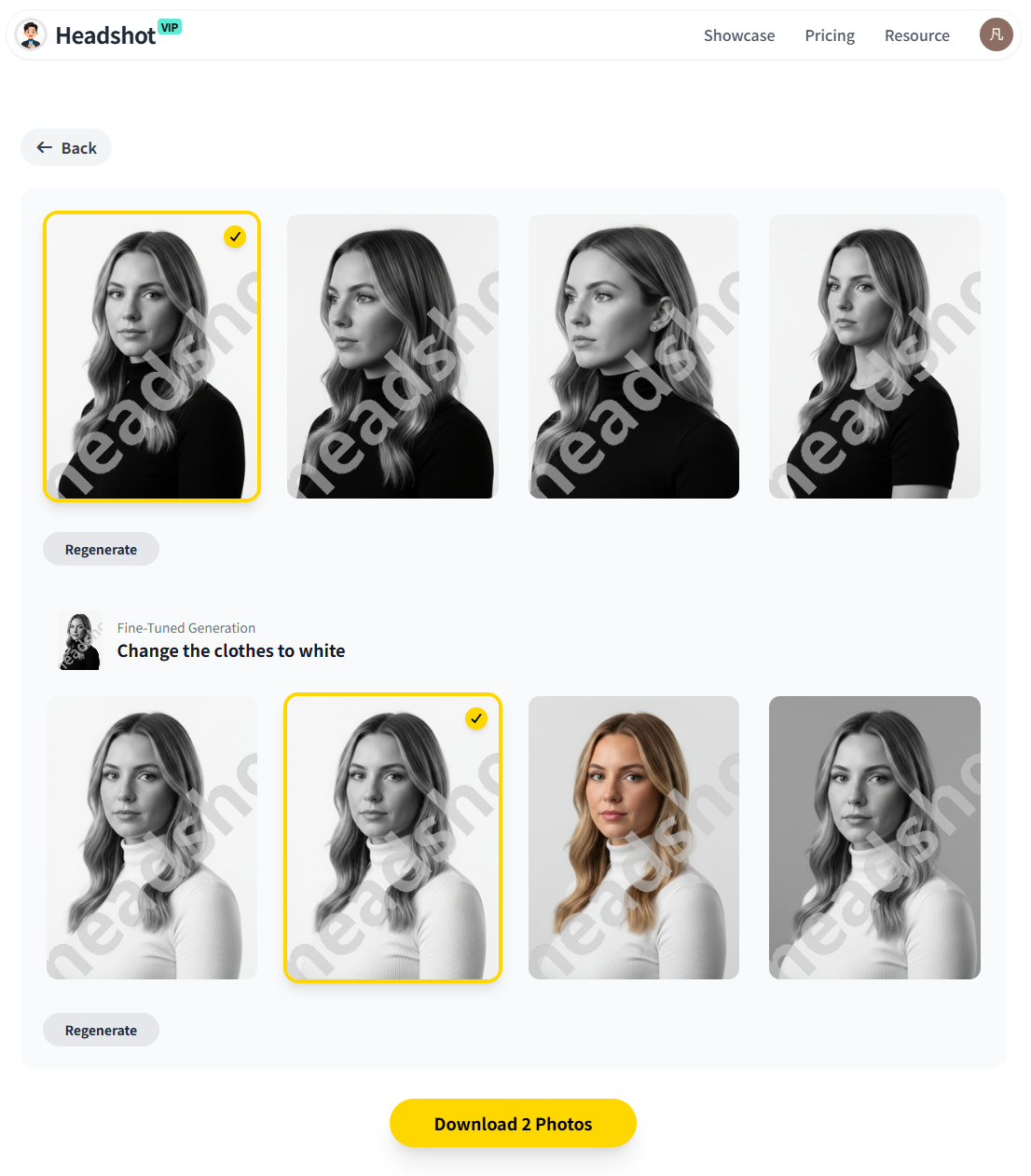
Alt: HeadshotVIP AI professional headshot results in LinkedIn and corporate styles
Why HeadshotVIP works especially well for business use
✅ Business‑first styles, not gimmicks
You get office‑appropriate looks out of the box: no cosplay, fantasy outfits, or random art filters mixed in.✅ Identity consistency across images
HeadshotVIP’s facial recognition and identity modeling help keep your face consistent, so your photos don’t look like different people.✅ Realistic lighting and backgrounds
Intelligent lighting and background reconstruction make the images feel like a real studio session, not obviously AI-generated.✅ Optimized for LinkedIn and resumes
Outputs are generated in aspect ratios and resolutions that work well across LinkedIn, ATS‑friendly resumes, and company websites.✅ Team‑friendly consistency
For companies, HeadshotVIP can apply the same style across all employees, keeping your About page, org chart, and internal tools visually consistent.
Honest limitations
To stay realistic:
- Results still depend heavily on your input photos. Blurry, dark, or heavily filtered selfies will limit quality.
- You don’t get full manual control like in a multi‑hour studio shoot (pose direction, micro‑retouching, in‑person lighting tweaks).
For most professionals, though, it’s more than enough to get a clean, trustworthy headshot at a fraction of the cost of a photographer.
2. Canva AI Headshot Generator – Best free option for quick upgrades
Best for: People who already use Canva and want a fast, free way to polish a selfie into something more professional.
Canva’s ProfilePhoto / AI Headshot Generator is built into its popular design platform. It’s not as specialized as dedicated headshot tools, but it’s a solid starting point — especially if you don’t want to spend money yet.
How it works in short:
- Open Canva and start a new design or use a template
- Go to Apps → ProfilePhoto / AI Headshot Generator
- Upload a selfie
- Select gender identity and whether to keep your facial expression
- Generate, then refine with Canva’s editor (Magic Eraser, filters, etc.)
- Download as JPG/PNG or publish directly to LinkedIn
Pros
- ✅ Free credits (Canva gives limited free uses per day)
- ✅ Built into a familiar interface many people already use
- ✅ Strong post‑editing tools (background remover, filters, cropping)
- ✅ Easy to export for social, resumes, or presentation slides
Cons (especially vs. HeadshotVIP)
- ❌ Not focused purely on business headshots — more general/creator‑oriented
- ❌ Less control over consistent business styles across multiple photos
- ❌ Likeness and realism can be less reliable than dedicated headshot tools
- ❌ Privacy and data use are governed by broad platform policies, not a headshot‑specific model
If you just need “better than my current selfie” and you’re comfortable inside Canva, it’s a reasonable starting point. If you’re preparing for interviews, investor decks, or a corporate site, a specialized tool like HeadshotVIP will usually give more consistent, professional results.
3. Aragon AI – Best for volume and advanced customization
Best for: Users who want a large number of options and advanced editing, and teams that care about certifications (SOC 2, GDPR).
Aragon AI markets itself as “the leading AI headshot generator,” and it’s one of the most widely used tools in the space. Reviewers who’ve tested dozens of tools often rank Aragon near the top for realism and number of usable images.
Key workflow:
- Choose attire and backgrounds from curated options
- Upload a handful of selfies (they suggest around 6 quality photos)
- Aragon trains a custom AI model just for you
- You receive up to 100+ headshots, depending on your plan
- Optionally use Aragon Remix to change backgrounds, outfits, and poses
Pros
- ✅ Very large output sets (40–100 images per package)
- ✅ Strong realism; many users say photos are “indistinguishable from real photographs”
- ✅ Remix feature lets you tweak backgrounds, outfits, and looks after generation
- ✅ Enterprise‑oriented security posture (SOC 2 Type II, GDPR, AES‑256 encryption)
- ✅ Transparent promise not to sell your data or train models on your photos without permission
Cons (especially vs. HeadshotVIP)
- ❌ Higher price points for individuals compared to leaner options
- ❌ Interface and many extra tools may feel overkill if you only want a few simple headshots
- ❌ Broader product scope (dating photos, glamour, cosplay, etc.) — less tightly focused on business only
Aragon is a strong fit if you:
- Want many variations to choose from (e.g., testing personal brand angles)
- Are a company that values formal compliance badges
- Enjoy tweaking your look with advanced editing tools
If you mostly need a clean, professional business headshot without extra complexity, HeadshotVIP’s simpler, business‑only focus may feel more efficient.
4. Independent reviewers’ favorites – What real testers say works
One of the more trustworthy ways to evaluate AI headshot tools is to look at people who’ve tested many of them side‑by‑side. For example, in a 2025 long‑form review where the author tested 30+ AI headshot generators, the top tools were:
- BetterPic – Praised for incredibly realistic results, especially with outdoor lighting
- Proshoot / Proshoot.co – Highest face likeness, very natural features, minimal “plastic” look
- Aragon AI – Noted for giving the most number of usable photos out of the batch
- HeadshotPro – Strong for strictly studio‑style business headshots, no casual/creative looks
- AI SuitUp – Recognized as a very affordable entry point with solid quality
What this tells you:
- Realism and likeness are now achievable across multiple tools
- There’s no single universal winner — it depends on your budget and use case
- Dedicated business‑only generators (like HeadshotPro and HeadshotVIP) stand out when you want predictable, corporate‑friendly results
HeadshotVIP vs other AI headshot options: quick comparison
Here’s a high‑level look at how the main options stack up for business use in 2025:
| Feature / Criteria | Canva AI Headshot Generator | Aragon AI | HeadshotVIP (Recommended) |
|---|---|---|---|
| Primary focus | General design & social | Broad AI photos (headshots + fun) | Business / LinkedIn headshots |
| Business-specific styles | Limited | Yes, plus many non‑business packs | Yes – LinkedIn, corporate, startup |
| Realism & likeness (for business use) | Good, but variable | Very strong in most test reports | High, tuned for professional realism |
| Number of outputs | Few per session | 40–100+ per package | Focused set of high‑quality options |
| Ease of use for non‑designers | Good if you know Canva | Simple, but many tool options | Very simple, business‑centric flow |
| Team / company consistency | Manual | Yes, via team offerings | Yes, style‑consistent team generation |
| Privacy posture (headshot‑specific) | General platform policies | Strong, SOC 2 + GDPR focus | Privacy‑focused image handling |
| Price for individuals | Free tier + paid Canva Pro | Mid to higher range | Starter and Pro tiers with fair value |
| Best for | Quick free improvements | Power users & security‑sensitive teams | Professionals wanting clean, trustworthy business photos |
How to choose the right AI professional headshot generator for your situation
If you’re still not sure which way to go, here are straightforward decision paths.
1. You just need “better than my current selfie”
- Try Canva’s AI Headshot Generator or a free/freemium tool as a first experiment
- Use Canva’s background remover and basic retouching to clean things up
- If the result still looks too casual or AI‑ish, move up to a specialized tool
2. You’re job hunting or making a serious career move
For LinkedIn, resumes, and application portals, your photo should look like it came from a real professional shoot.
- Pick a business‑focused tool like HeadshotVIP or HeadshotPro
- Spend time choosing good source photos — this matters more than the tool you choose
- Aim for 1–3 final headshots in slightly different outfits/backgrounds you can use across platforms
3. You’re a founder or creator building a personal brand
You may need:
- Corporate‑ish images for investors and press
- Warmer, more relaxed looks for content and social media
- Consistent visuals across your website, newsletter, and profiles
Consider:
- HeadshotVIP for the clean business set
- Aragon or other multi‑style tools if you want additional casual or themed looks
4. You’re a company that needs team headshots
Key requirements:
- Visual consistency (same style, framing, and background)
- Easy onboarding of new hires over time
- Reasonable cost vs ordering new photoshoots every quarter
Look for:
- Team / business plans with shared styles (HeadshotVIP, Aragon, HeadshotPro all have options)
- Clear privacy terms and, ideally, some compliance story
- Ability to regenerate new hires in the same style months later
HeadshotVIP’s team / business tier focuses on style‑consistent batch generation, which is particularly handy for startup websites and internal tools like Slack and Notion.
Practical tips to get realistic AI professional headshots
No matter which tool you choose, these tips will dramatically improve your results.
1. Feed the AI high‑quality input photos
The model can’t fix:
- Extremely blurry or low‑resolution selfies
- Heavy filters (beauty apps, face slimming, etc.)
- Strong backlight that hides your features
Use:
- Natural daylight (near a window)
- A simple background (wall, office, or outside with depth)
- A neutral, relaxed expression you’d be happy showing in a meeting
2. Match outfits to your industry
Even with AI outfits:
- Finance, law, and enterprise: suits, blazers, simple shirts, neutral colors
- Tech and startups: smart casual, like a solid T‑shirt with a blazer, or a neat shirt
- Creative fields: add a bit of personality, but keep it clean (one standout element is enough)
When you choose styles in HeadshotVIP, think of the dress code where your ideal employer or client works.
3. Keep your headshot consistent across platforms
You don’t need the exact same crop everywhere, but keep:
- The same general look (hair, age, style) across LinkedIn, website, and resumes
- Variations of the same shoot or AI set so people recognize you easily
Tools like HeadshotVIP help by generating coherent sets you can slice for different uses.
4. Don’t over‑edit
A few tweaks are fine (cropping, minor color adjustments), but:
- Avoid extreme skin‑smoothing
- Don’t change your eye color, jawline, or core features
- Keep your age roughly accurate — recruiters notice when a headshot feels “too young” for the rest of the profile
The goal is “best version of you at work,” not “entirely different person.”
FAQ: AI professional headshots for business in 2025
Q1: Are AI professional headshots acceptable on LinkedIn and in job applications?
Yes. In fact, tools like Aragon have been featured in mainstream outlets, and studies cited in the press suggest many recruiters actually rate high‑quality AI headshots as favorably (or more) than casual real photos, as long as they look realistic and professional. The key is to avoid obviously fake or heavily stylized images. A HeadshotVIP‑style business portrait is typically seen as completely acceptable.
Q2: How many photos should I upload to get good AI headshots?
Most tools recommend 5–15 clear selfies. For HeadshotVIP, aim for at least 5 strong, varied photos: different angles, lighting, and slight expression changes. Quality beats quantity — three sharp, well‑lit photos are better than 20 grainy screenshots.
Q3: Is my data safe when I use an AI headshot generator?
It depends on the provider. Reputable tools explain how they:
- Store and encrypt your photos
- How long they keep them
- Whether they’re used to train models
HeadshotVIP uses privacy‑focused image processing and handling, and like Aragon’s approach, is designed around not reselling your data. Always read the privacy policy before uploading anything sensitive.
Summary
AI professional headshot tools in 2025 are finally good enough to handle most everyday business needs — from LinkedIn and resumes to company websites and team pages.
- Canva is a great free entry point to quickly tidy up a selfie.
- Aragon AI shines when you want lots of variations, advanced editing, and enterprise‑level security.
- Independent testers highlight tools like BetterPic, Proshoot, and HeadshotPro for strong realism in specific scenarios.
- HeadshotVIP focuses on what most professionals actually need: realistic, privacy‑conscious, business‑only headshots, with clean workflows for both individuals and teams.
If you’re preparing for a job search, promotion, or new business launch, a small investment in a realistic AI headshot is often more impactful than another generic CV tweak.
Try HeadshotVIP Now:
- Starter – from $6.99: ideal for individuals who need a small set of polished headshots
- Professional – from $9.99: more styles and higher‑resolution outputs for multi‑platform use
Related Articles
- best-ai-professional-headshot-generator-for-linkedin-2025
- ai-professional-headshot-branding-guide-2025
- ai-headshot-generation-privacy-protection-guide-2025
Current Date: 2026-01-22