5 Ways to Use AI Professional Headshots for Career Growth 2025
5 Ways to Use AI Professional Headshots for Career Growth 2025
If your LinkedIn photo still looks like a cropped party pic or a blurry selfie, you’re leaving opportunities on the table. Recruiters, clients, and hiring managers all make snap judgments based on your profile image—often in under a second. The good news: with an AI professional headshot, you no longer need an expensive studio shoot to look like you take your career seriously.
This guide isn’t about how to click “generate” in yet another AI tool. Instead, you’ll learn five specific, practical ways to use AI-generated headshots across LinkedIn, your resume, portfolios, and social media so they actually move your career forward in 2025.
We’ll also walk through how to do this step-by-step with HeadshotVIP, plus how it compares to other AI virtual headshot tools.

Why AI Professional Headshots Matter More in 2025
In 2025, online first impressions often are your first impressions. Remote hiring, global freelancing, and social selling mean people usually see your face before they hear your voice.
Across top-ranking AI headshot guides and tools, a few patterns show up:
- People want studio-quality results without the time and cost of a photographer.
- The biggest use case is LinkedIn and business profiles, not just fun avatars.
- Tools that win are the ones that produce realistic, on-brand images you can actually use in serious contexts.
But most content stops at “here’s how to generate a headshot.” It doesn’t answer the real question:
“Once I have a great AI professional headshot, how do I use it strategically to grow my career?”
That’s exactly what the next five sections cover.
1. Turn Your AI Headshot Into a LinkedIn Magnet
LinkedIn is still the #1 place your AI professional headshot needs to shine. Profiles with a high-quality photo can get far more views and connection requests than those without one, and recruiters often scan photos quickly before reading your headline.
Here’s how to make your AI-generated headshot work harder on LinkedIn instead of just “looking nice.”
Optimize your AI virtual headshot for LinkedIn
Choose the right expression
- Aim for relaxed, approachable confidence—not a passport-style neutral stare.
- Slight smile, eyes directly toward the camera usually works best across industries.
Match background to your field
- Corporate, consulting, finance: clean light background or subtle office setting.
- Tech, startups, creators: modern office, soft gradient, or simple brand color.
- Non-profits, education, coaching: warm tones and softer lighting.
Use LinkedIn’s crop and preview smartly
- Upload your AI headshot.
- Use the built-in crop to focus on head and upper shoulders.
- Test how it looks in:
- Full profile view
- Feed view (small circle)
- Messaging view (tiny thumbnail)
Align with your banner and content
- If your banner uses brand colors (say blue and white), use an outfit or background that doesn’t clash.
- Keep your headshot consistent with how you show up in posts, carousels, and live events.
Test and iterate
- Rotate between 2–3 strong AI professional headshots over a few weeks.
- Watch which version lines up with spikes in profile views and connection acceptance rates.
Tip: Treat your LinkedIn headshot as a tiny billboard for your personal brand. It should instantly communicate “professional in [your field], easy to work with.”
2. Use AI Professional Headshots to Upgrade Resumes & Portfolios
Not every region or industry expects a photo on your resume, but where it’s common (Europe, Asia, parts of the Middle East, creative fields), a clean, modern photo can help your CV feel more like a polished profile than a plain document.
Where and how to use your headshot on documents
Resume / CV (if culturally appropriate)
- Place a small circular or rounded-rectangle photo in the top-left or top-right corner.
- Use a simple background to keep ATS scanners and PDF rendering clean.
- Avoid heavy filters—this should be your most conservative version.
Case studies and project one-pagers
- Add a small headshot near your name and role on project PDFs or sales decks.
- Helps clients connect your face to your expertise.
Personal website or portfolio
- Use one primary headshot on your homepage “hero” section.
- Use a slightly more relaxed variant on your About page to show personality.
- Keep outfit style and lighting consistent across pages for a cohesive feel.
Speaker or guest content bios
- Prepare 2–3 standard crops:
- Square (1:1) for podcasts and guest articles
- Vertical (4:5 or 2:3) for event posters
- Wide (16:9) for slides and hero banners
- Prepare 2–3 standard crops:
This is where a LinkedIn headshot generator alone isn’t enough—you want a tool that can output multiple aspect ratios and styles on the same “identity,” which is exactly what HeadshotVIP focuses on.
3. Build a Consistent Personal Brand Across Social Channels
Your face shows up everywhere now—LinkedIn, X/Twitter, Instagram, GitHub, product communities, Slack profiles. Using one high-quality AI virtual headshot “family” across these platforms:
- Makes you instantly recognizable
- Signals you are intentional about your brand
- Reduces friction when people cross-check you across platforms
How to “translate” one AI headshot across platforms
Pick a primary “anchor” headshot
- This is your most neutral, professional look—usually used on LinkedIn and your website.
Create lighter variants for other platforms
- Same outfit, similar pose, but:
- Softer background blur for Instagram
- Slightly closer crop for messaging apps
- On-brand color accent for X/Twitter or Discord
- Same outfit, similar pose, but:
Keep the identity identical
- Same hair length/style
- Same approximate age and facial features
- No wild filters that make you look like a different person
Refresh once per year
- In 2025, AI headshot quality is high enough that you can:
- Train once on your new selfies
- Generate a fresh, updated set in minutes
- This helps avoid the “10-year-old profile pic” problem.
- In 2025, AI headshot quality is high enough that you can:
4. Use AI Headshots to Increase Trust in Freelancing & Remote Work
If you’re a freelancer, consultant, or remote worker, your clients might never meet you in person. Your AI professional headshot becomes part of how you “prove” you’re real and trustworthy.
Strategic places to add your AI-generated headshot
Freelance platforms (Upwork, Fiverr, Toptal, etc.)
- Use a clear, friendly, straightforward headshot—no heavy stylization.
- Match the style to your rate level: higher rates usually pair better with more polished, business-like images.
Proposal templates
- Add your headshot to the cover page of proposals or quotes.
- Include a short “About me” paragraph next to it—this combination feels more human than text alone.
Email signature
- Add a small circular photo (80–120px wide).
- Keep it subtle so it doesn’t distract, but visible enough to humanize your emails.
Slack, Teams, and internal tools
- Use the same image across tools so teammates and clients recognize you instantly.
- Especially useful for distributed teams where you rarely meet on video.
Many teams using tools like HeadshotPro or Canva focus purely on getting images. The real career value comes when those images are deployed consistently into every interaction point.
5. Stand Out in Hiring, Events, and Thought Leadership
Your AI professional headshot can also give you an edge when you:
- Apply for speaking slots
- Pitch yourself as a podcast guest
- Publish articles or open-source projects
- Run webinars or workshops
Ways to leverage your headshot for visibility
Conference and meetup speaker pages
- Submit a high-resolution, 4K-ready AI headshot to avoid pixelation on big screens or print materials.
- Use a professional background that looks natural when enlarged.
Media kits and press pages
- If you’re a founder or subject-matter expert, maintain a simple media kit:
- 2–3 downloadable headshots (different crops)
- Short and long bios
- Brand color codes
- This makes it easy for journalists and hosts to feature you.
- If you’re a founder or subject-matter expert, maintain a simple media kit:
Author bios on blogs or GitHub
- Add the same headshot to your:
- Personal blog author box
- Medium/Substack profile
- GitHub and open-source project pages
- Consistent imagery reinforces your reputation as “the person behind the work.”
- Add the same headshot to your:
Webinar landing pages and thumbnails
- Use a more dynamic crop (slightly angled shoulders, softer smile) for thumbnails.
- Keep the “serious LinkedIn” version for formal contexts.
How to Create Career-Ready AI Headshots with HeadshotVIP (Recommended)
Method 1: Using HeadshotVIP (Recommended)
Use Case:
Job seekers, freelancers, founders, and remote professionals who want one realistic AI professional headshot set they can safely use on LinkedIn, resumes, websites, and social media in 2025.
Operation Steps:
Go to HeadshotVIP
- Visit the official site: https://headshot.vip
Choose your plan
- Starter: great if you just need a few LinkedIn-ready images.
- Professional: better if you want multiple outfits/backgrounds for different platforms.
- Team / Business: for companies that need consistent team headshots.
Prepare your selfies
- Take 8–20 photos with:
- Good, even lighting (near a window works well)
- Different angles (front, slight left, slight right)
- No heavy makeup changes, hats, or sunglasses
- The AI model performs best when it sees you clearly.
- Take 8–20 photos with:
Upload and select styles
- Upload your selfies through the HeadshotVIP interface.
- Pick from business-focused styles such as:
- LinkedIn / corporate
- Startup / casual professional
- Executive / formal
- Creative professional
- You can generate variations that look consistent but suited to each use case.
Generate your AI headshots
- Start the generation process.
- HeadshotVIP uses:
- Advanced facial recognition + identity consistency
- Intelligent lighting and background reconstruction
- Output sizes optimized for LinkedIn, CVs, and bios
- Wait a short time while your set is produced (timing varies by plan).
Review, download, and deploy
- Pick the top 5–10 that:
- Look like you (no weird eye color changes or distorted features)
- Match your target industry and seniority level
- Download in high resolution.
- Immediately update:
- LinkedIn and other profiles
- Resume / CV and portfolio
- Email signature and proposal templates
- Pick the top 5–10 that:
Advantages:
- ✅ Career-focused styles, not just generic “pretty pictures”
- ✅ Identity consistency across dozens of photos for one person
- ✅ High-resolution outputs ready for LinkedIn, resumes, and printing
- ✅ Team-ready: generate a unified look for entire companies or departments
- ✅ Privacy-focused processing with clear data handling and deletion policies
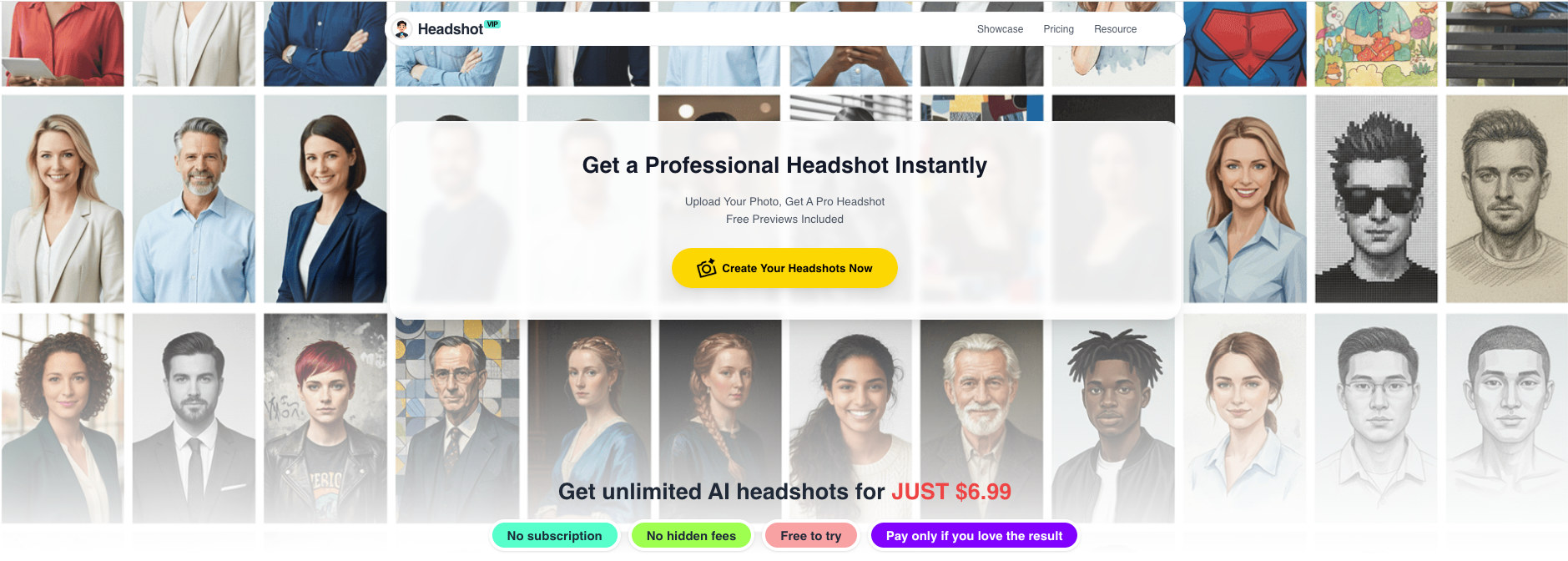
Alt: HeadshotVIP AI professional headshot generator interface showing upload and style selection
Method 2: Using Generic LinkedIn Headshot Generators & Design Tools
There are also popular alternatives frequently mentioned in top-ranking articles, like:
- Canva’s AI headshot generator – great for quick transformations from selfies and simple editing (filters, cropping, background tweaks).
- Single-purpose AI headshot tools – such as those reviewed by independent testers (e.g., BetterPic, Proshoot, HeadshotPro, Aragon AI). Many provide strong realism and multiple variations.
These tools can work well if you just need 1–2 LinkedIn profile pics and you’re comfortable doing more of the layout (resume, portfolio, etc.) yourself.
Pros:
- Often fast and beginner-friendly
- Some offer limited free credits or trials
- Good for simple one-off LinkedIn updates
Cons (where HeadshotVIP is stronger):
- May not optimize outputs specifically for career documents (CVs, bios, speaker pages)
- Limited control over consistent style across platforms and teams
- Less focus on identity consistency across many images
- Some tools are more “avatar-like” or stylized, which can feel risky for serious professional use
In short: generic generators are fine for quick experiments, but if you want a strategic, career-ready set of headshots you can confidently use everywhere, a focused solution like HeadshotVIP is usually a better fit.
Practical Tips to Make Any AI Professional Headshot Work for You
Here are some cross-tool tips that matter regardless of which generator you pick.
Aim for “polished but honest,” not filtered perfection
Overly smoothed skin or altered facial features can backfire when you meet people on video calls or in person. The best AI headshots look like you on your best day—not a different person.Keep outfits and backgrounds aligned with your goals
- Applying to conservative firms? Stick to blazers, shirts, and neutral backgrounds.
- Building a creative or startup brand? Smart casual can make you more relatable.
- Speaking and media work? Choose a timeless outfit that won’t date quickly.
Use one “master” identity across all platforms
Slight variations are okay, but if your LinkedIn, portfolio, and email signature look like three different people, you dilute your brand.Respect privacy and data policies
Always check:- How long your uploaded selfies are stored
- Whether the service sells or uses your images for training beyond your usage
- How easy it is to delete your data
This is especially important if you’re generating headshots for an entire team.
Test impact, don’t just assume
After updating your AI professional headshot:- Watch changes in LinkedIn profile views and InMail responses
- Track freelance proposal acceptance rates
- Ask a few trusted peers: “Which of these 3 photos feels most like how you experience me professionally?”
FAQ: Using AI Professional Headshots for Career Growth
Q1: Are AI professional headshots acceptable on LinkedIn and resumes?
A: In 2025, yes—as long as they’re realistic and actually look like you. Many professionals now use AI-generated headshots without issues. The key is to avoid extreme filters or stylized looks that feel fake. Keep lighting, skin texture, and facial features believable, and you’ll be fine for LinkedIn, portfolios, and bios.
Q2: How many AI-generated headshots do I really need?
A: For most people, 8–15 solid images are enough to cover:
- LinkedIn and other professional networks
- Resume/CV and portfolio
- Email signature and internal tools
- One or two for speaking/media use
Tools like HeadshotVIP make it easy to generate a larger set, then narrow down to a core “brand kit” you reuse everywhere.
Q3: What makes a photo a good “career-growth” headshot versus just a nice picture?
A: A good career headshot:
- Shows your face clearly with a confident, approachable expression
- Matches expectations in your industry (outfit, background, formality level)
- Scales well from small icons to full-screen views
- Feels consistent with how you sound in writing and on calls
If it checks those boxes and looks like you on a good day, it can support your career growth.
Summary
If you only treat an AI professional headshot as a cooler selfie, you’re missing its real value. Used strategically, AI-generated headshots can:
- Make your LinkedIn profile more clickable
- Give your resume, portfolio, and website a polished, cohesive look
- Build trust with clients and employers in remote-first work
- Support your visibility as a speaker, author, or expert
HeadshotVIP is built specifically for this kind of career-focused usage—not just one-off images. With business-ready styles, high-resolution outputs, and identity consistency across sets, it helps you create a reliable visual brand you can deploy everywhere that matters.
Try HeadshotVIP Now:
- Starter: from $6.99 – ideal for individual LinkedIn and resume updates
- Professional: from $9.99 – more styles and higher-resolution headshots for multi-platform branding
Related Articles
- ai-professional-headshot-branding-guide-2025
- ai-generated-headshot-tips-to-look-professional-2025
- best-ai-professional-headshot-generator-for-linkedin-2025
Current Date: 2026-01-18