Boost AI professional headshots for business in 2025
Boost AI professional headshots for business in 2025
If you run a business in 2025, your “first impression” almost never happens in person. It happens on your website, in a pitch deck, on a sales one‑pager, or in an email signature.
The problem?
Coordinating a proper photo shoot for yourself or your team is slow, expensive, and almost always gets pushed down the to‑do list. You end up with a mix of old selfies, vacation photos, and mismatched portraits across your brand.
Here’s how to fix that with an AI professional headshot strategy built for business results—not just LinkedIn vanity. This guide shows you concrete ways to use AI generated headshots across your website, team pages, decks, ads, and brand assets, plus a step‑by‑step walkthrough using HeadshotVIP.

Why AI professional headshots matter for business in 2025
Most AI headshot content focuses on job seekers and LinkedIn. If you’re a founder, consultant, agency owner, or small business, you care about something more specific:
“Will this photo make clients trust us faster and buy with more confidence?”
Several things have changed in 2024–2025 that make AI virtual headshots especially useful for business:
Clients research harder
Buyers Google your name, check your About page, scan LinkedIn, and look at who’s behind the brand before signing.Remote & global teams are the norm
Getting everyone into a studio is unrealistic. Yet a scattered mix of photo styles makes your brand feel less credible.AI headshot generators got much better
Leading tools (like Aragon, Canva, HeadshotPro, etc.) proved that AI can create portraits many recruiters and customers can’t distinguish from studio shots. You no longer need to settle for “AI-ish” faces.Visual consistency has real revenue impact
Clean, on‑brand business headshot creation across your site and decks subtly signals reliability, process, and professionalism.
Instead of using an AI generated headshot only as a profile picture, think of it as a reusable brand asset. One good photo set can be repurposed in 15+ places that support sales, trust, and retention.
High‑ROI ways to use AI professional headshots across your business
Most reference articles talk about “get a LinkedIn photo in minutes.” That’s useful, but limited. Here’s a more business‑focused playbook you can actually use.
1. Turn your website into a trust engine
Your website is usually the first deep touchpoint. Clean, consistent AI professional headshots let you do more than just “look presentable.”
Where to use them:
About / Team page
- Use matching backgrounds and lighting for all team members.
- Group people by function (Leadership, Delivery, Customer Success) and keep style consistent inside each group.
- For small teams, use one stronger, slightly more formal style (executive or corporate).
Service / Practice pages
- Add 1–3 AI virtual headshots of the people delivering the service near your offer or pricing section.
- Include short bios (“10+ years in B2B SaaS growth”) under each headshot to move visitors closer to contacting you.
Homepage “Meet your experts” strip
- A row of 3–5 clean headshots with names and roles instantly makes your brand feel real and personal.
Why it works:
People don’t buy “a company.” They buy from faces they can connect with. Good portraits next to your offers lower perceived risk and reduce the sense of “faceless brand.”
2. Level up pitch decks and investor materials
If you raise money, pitch clients, or respond to RFPs, your deck is often printed or forwarded without you in the room. The Team and Advisors slides can help win trust or quietly weaken you.
How to use AI headshots in decks:
Team slide
- Generate a uniform style (same crop, background, and attire level) for everyone.
- Use business‑relevant looks: startup‑casual for tech, formal for finance, warm and approachable for service businesses.
“Who you’ll work with” slide for enterprise deals
- Show the delivery team or account squad with clear portraits, roles, and 1‑line credibility (“Led 25+ enterprise rollouts”).
Advisory board / Partner logos + faces
- Combine logos with clear headshots to avoid “random logo wall” syndrome.
Pro tip:
Export a square and 4:5 vertical version of your AI professional headshot. Square looks great in decks; 4:5 works well when a prospect drags your photo into their internal docs or CRM.
3. Increase email and outbound reply rates
Outreach is colder than ever. Adding a human layer helps.
Where to use your AI virtual headshot:
Email signature
- Simple square or circular headshot, neutral background, good eye contact.
- Works especially well for sales reps, consultants, and support leaders.
Cold email sequences & nurture campaigns
- Use your headshot next to short “from the founder” notes in onboarding flows or case study emails.
Calendly / booking pages
- Most teams forget this step. A clean headshot on your scheduling page reassures people that a real pro will show up.
This doesn’t magically fix bad outreach, but it lifts response and show‑up rates because your messages feel less spammy and more like a real person reaching out.
4. Make your ads and landing pages more believable
AI ad creatives are everywhere now, and audiences are noticeably skeptical. Showing the actual people behind the brand can put you in a different bucket.
Ideas for using AI generated headshots:
Founder‑led ads
- “Talk to me and my team” style pages and video thumbnails featuring your own AI professional headshot.
Testimonial & case study layouts
- If clients don’t want to share their face, you can still anchor your own team members visually next to results (“Our lead strategist on this project”).
Lead magnets & webinars
- Feature consistent, high‑quality headshots of presenters instead of random stock photography.
The key difference: AI is used to make your real face look its best, not to invent fictional humans.
5. Clean up your brand across every touchpoint
Once you have a strong set of AI headshots, you can roll them out everywhere to tie your brand together:
- LinkedIn, X, Instagram bio, personal site
- Client portals and Slack profiles
- Community platforms (Circle, Skool, Discord roles)
- Conference speaker pages
- Online course instructor bios
- Media kit and press page
One style‑consistent headshot set used everywhere makes your business feel steady, serious, and deliberate.
How to create business‑ready AI professional headshots (step‑by‑step)
There are many tools in this space. Canva focuses on simple edits; Aragon and others emphasize large sets and lots of variations.
For business use, you usually want three things:
- Identity consistency (it really looks like you)
- Business‑appropriate styles (not cosplay, cartoons, or gimmicks)
- Privacy‑respecting processing (no random training on your face)
Below is a concrete workflow with HeadshotVIP, which is built specifically for fast, high‑fidelity, privacy‑safe business headshots.
Method 1: Using HeadshotVIP (Recommended)
Use Case:
Professionals, founders, agencies, and small teams who want studio‑quality, business‑focused AI professional headshots they can safely use across websites, decks, and marketing materials—without booking a photographer.
Operation Steps
Go to HeadshotVIP
Visit the official site:
👉 https://headshot.vipCreate your account
- Sign up with your business email (recommended so assets are easy to manage later).
- Confirm your email and log in to the dashboard.
Choose the right plan
- Starter – Good if you just need a few headshots for yourself.
- Professional – Better if you want more styles (e.g., LinkedIn + executive + creative) and higher‑resolution exports.
- Team / Business – If you need consistent business headshot creation for multiple people (sales team, leadership, whole company), request custom pricing.
Prepare and upload your selfies
You’ll get the best results if you spend 5 minutes on this step.
- Use 6–15 clear photos of yourself.
- Mix angles: front, slight left, slight right.
- Use natural or even lighting; avoid harsh shadows.
- Don’t cover your face with hats, sunglasses, or heavy filters.
- Keep expressions natural (light smile works great for most business contexts).
Then in HeadshotVIP:
- Click Upload photos.
- Drag and drop your selfies or select from your computer.
- Confirm when all required photos are uploaded.
Select your business styles
HeadshotVIP includes multiple business‑oriented style presets, for example:
- LinkedIn‑standard corporate
- Executive / board‑level
- Startup founder semi‑casual
- Creative professional (design, marketing, creator)
- Neutral, simple studio background for team pages
Choose 1–3 styles that match how you actually show up with clients. You can always generate more later.
Generate your AI professional headshots
- Click Generate headshots.
- HeadshotVIP builds a private model of your face and starts creating a set of images in your selected styles.
- Wait for the process to finish (usually minutes, depending on plan).
- You’ll get an email when your gallery is ready.
Review, favorite, and download
- Open your gallery and quickly filter:
- Favor images that truly look like you (especially eyes and smile).
- Prioritize neutral, non‑distracting backgrounds for business use.
- Download the best ones in high resolution for:
- Website / print (full‑res)
- Social / profile pics (smaller export if you like)
You can keep separate folders:
/Brand/Website_Headshots//Brand/Decks//Personal/LinkedIn/
- Open your gallery and quickly filter:
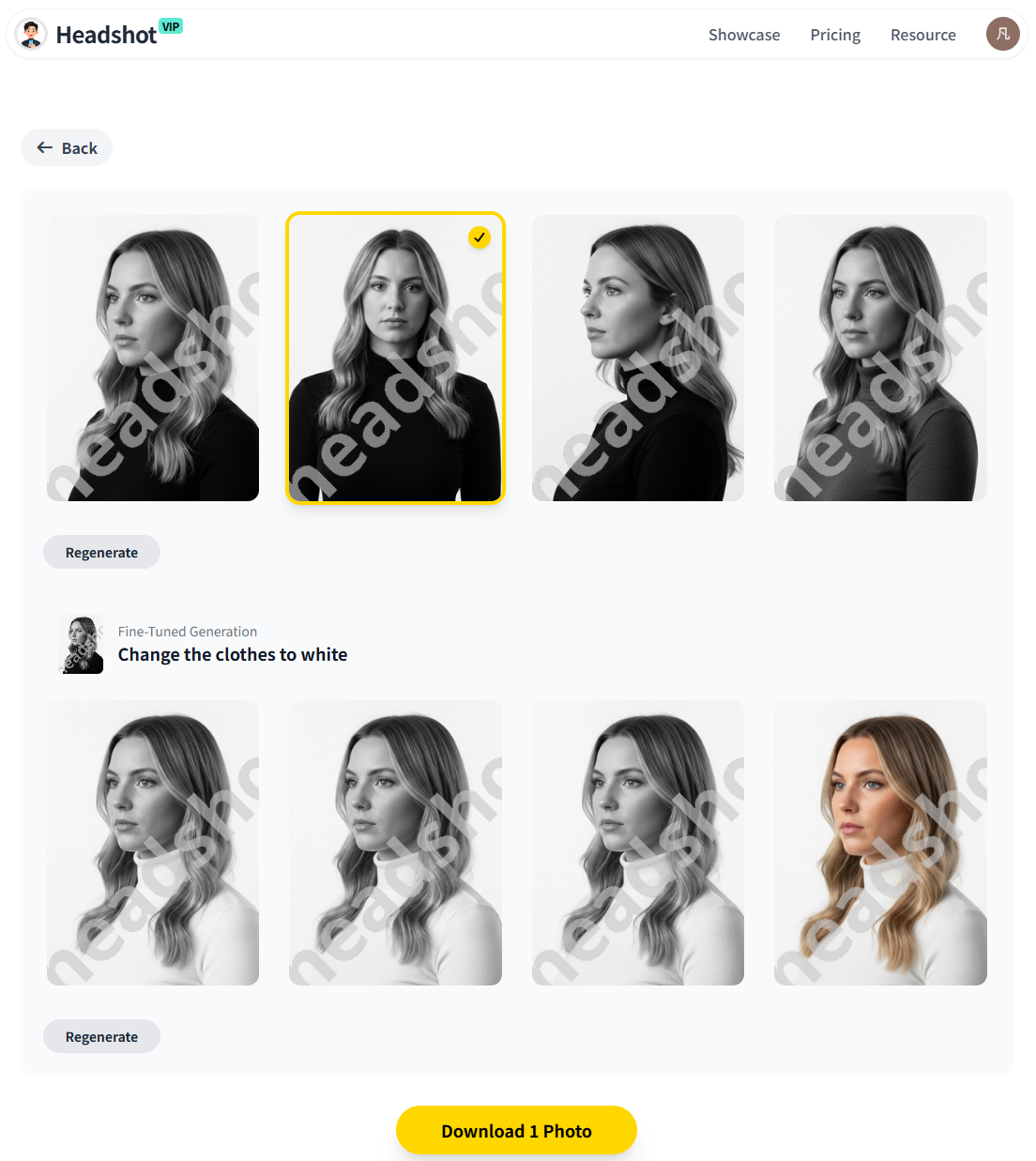
(Example: HeadshotVIP AI professional headshot results in consistent business styles)
Advantages of using HeadshotVIP for business
✅ Business‑first styles
HeadshotVIP focuses on professional looks (corporate, startup, executive, creative) instead of novelty filters and costumes.✅ High‑fidelity identity
Advanced facial recognition and identity consistency modeling help keep your real features intact across multiple poses and backgrounds.✅ Fast, simple workflow
Upload → choose styles → generate → download. No complex prompts, no design skills needed.✅ Team‑ready consistency
Style‑consistent batch generation means everyone on your team can share the same background look and overall vibe, even if you’re in different countries.✅ Privacy‑focused handling
Photos are processed with privacy in mind; HeadshotVIP is built for professionals who care about how their likeness is handled.
Limitations to be aware of (honest view):
- Results still depend heavily on input photos. Very dark, blurry, or heavily filtered selfies will limit quality.
- You get less manual pose control than a live photographer directing you on set. If you need extremely specific poses, a traditional shoot may still be better.
Method 2: Alternative approaches from other tools
You might already know or use tools like Canva’s AI headshot generator or popular services like Aragon AI and other reviewed platforms.
Here’s how they generally stack up for business use.
Option A: Canva’s built‑in AI headshot app
Canva’s ProfilePhoto app can turn a selfie into a more polished image directly in their editor.
Pros:
- Integrated with Canva’s design tools (great if you’re already making decks and social content there).
- Very fast for one‑off headshots.
- Free credits available with basic usage.
Cons (for business branding):
- Geared more towards personal / social profile pictures than full business brand systems.
- Limited in style control specifically for business roles (e.g., no “team‑wide style consistency” tooling).
- Not ideal for managing headshots across bigger teams or multiple export needs.
Option B: Dedicated AI headshot generators (e.g., Aragon AI, others)
Tools like Aragon AI and several services reviewed in “I Tested 30+ AI Headshot Tools” focus heavily on volume and realism.
Pros:
- Very realistic results in many cases.
- Large sets of photos with different backgrounds and outfits.
- Some tools support both fun and professional modes.
Cons (relative to HeadshotVIP’s focus):
- Many tools optimize for individual users (LinkedIn, dating, personal branding) rather than business deployment.
- Pricing and features can be overkill if you just want clean, simple, business‑first headshots.
- Team consistency and privacy policies vary; you need to check how your images may be used or trained on.
How HeadshotVIP compares for business branding
If you’re choosing a tool primarily for business branding, it helps to look at features side by side.
Business‑focused comparison
| Feature / Need | Canva AI Headshot App | Generic AI Headshot Tools (e.g., Aragon‑style) | HeadshotVIP |
|---|---|---|---|
| Main focus | Quick profile photo edits | Large sets & general headshots | Business‑focused, branding‑ready headshots |
| Best for | Solo users, social profiles | Individuals wanting many variations | Professionals, founders, small teams & companies |
| Business‑specific style presets | Limited | Mixed (fun + pro) | Yes – LinkedIn, corporate, startup, executive, creative |
| Team‑wide visual consistency | Manual | Varies | Yes – style‑consistent batch generation |
| Workflow simplicity for non‑designers | Good (inside Canva) | Often simple, but choice overload | Very simple, optimized for “upload → generate → brand use” |
| Identity consistency across many photos | Decent | Strong in top tools | Strong, tuned for professional accuracy |
| Privacy / training sensitivity | General SaaS policies | Varies by vendor | Privacy‑focused, business‑oriented use |
| Ideal use cases | Quick upgrade to a selfie | LinkedIn, personal branding, experiments | Websites, About pages, decks, sales assets, team branding |
Practical tips to get the most out of AI professional headshots in 2025
You don’t need a photographer to get good results, but you do need a bit of intention. Use this checklist to make your AI headshots work harder for your business.
1. Match attire and style to your buyers
- Selling to enterprise or finance?
- Choose more formal attire: blazer, collared shirt, cleaner backgrounds.
- Serving creatives, startups, or small businesses?
- Slightly relaxed clothing, softer colors, maybe a subtle textured background.
- In healthcare, coaching, education?
- Prioritize warm, approachable expressions and softer lighting.
Your AI professional headshot should make sense to the people you sell to—not just look fancy.
2. Keep backgrounds simple and on‑brand
Busy backgrounds distract. For most business use:
- Stick to neutral studio backdrops or soft gradients near your brand colors.
- Avoid trendy neon, extreme bokeh, or obviously fake environments for serious use.
- Use the same or very similar background across:
- Website team photos
- Decks
- Email signatures
This subtly says, “We have our act together.”
3. Maintain consistency across all platforms
Once you pick one or two primary headshots, resist the urge to constantly swap them.
- Use the same image on:
- LinkedIn + website bio + email signature
- Speaking pages + podcast guest bios
- Keep an internal note:
- “Official headshot v1 – valid 2025–2026.”
That way, when press, partners, or clients request a photo, you’re always sending a brand‑aligned, up‑to‑date image.
4. Create a simple “visual identity” doc for your team
If you run a team, write a 1‑page mini‑guide and share it with everyone:
- Chosen headshot style (e.g., light grey background, smart‑casual, light smile)
- File naming convention (e.g.,
firstname-lastname-headshot-2025.png) - Where files live (shared drive or DAM)
- When to update (e.g., every 18–24 months or when roles change)
If you use HeadshotVIP’s team plan, you can generate everyone’s AI virtual headshot in that same style, so they don’t need to guess.
5. Be transparent but confident about AI use
Some people worry, “Will clients care that my headshot is AI generated?”
In 2024, multiple outlets reported that a strong majority of recruiters actually preferred well‑done AI headshots over bad camera photos, as long as they clearly represent the person.
For business use:
- Make sure your headshot truly looks like you. No radical face reshaping, no unrealistic changes.
- Use it confidently across your brand. You don’t need to loudly announce “this is AI,” but you also don’t need to hide it.
- If asked, you can say:
“We used an AI professional headshot tool to create studio‑quality photos that better match our brand.”
Trust comes from accuracy and consistency, not from whether you booked a physical studio.
FAQ: AI professional headshots for business
Q1: Are AI professional headshots good enough for serious business use?
A: Yes, when done well. Modern tools can produce images that are hard to distinguish from studio photography. The key is to start with clear selfies, choose business‑appropriate styles, and avoid over‑smoothing or unrealistic retouching. Many professionals now use AI generated headshots on company sites, pitch decks, and LinkedIn with excellent results.
Q2: Can I use the same AI headshot everywhere, or do I need different ones for each platform?
A: You can absolutely use the same primary headshot across your website, LinkedIn, email signature, and decks. In fact, it’s often better for brand recognition. Some people like to keep a slightly more relaxed variant for social platforms and a more formal one for investor decks, but consistency is more important than variety.
Q3: What if my current selfies are low quality? Should I still try an AI generator?
A: You’ll get far better results if you take a few new selfies with intention. Use a window or soft light, clean background, and your normal business attire. A quick 5‑minute mini‑shoot with your phone can dramatically improve what the AI model can do. If photos are very dark, blurry, or heavily filtered, even the best AI tools (including HeadshotVIP) will struggle.
Summary
In 2025, an AI professional headshot is no longer just a quick LinkedIn fix. It’s a core brand asset you can reuse across:
- Website and team pages
- Pitch decks and investor materials
- Email signatures, outreach, and landing pages
- Courses, media kits, conferences, and more
Tools like Canva and major AI headshot platforms proved that AI can create realistic portraits at scale. HeadshotVIP focuses that power specifically on business branding—giving you fast, privacy‑safe, high‑fidelity headshots in styles that match how you really work.
If you want your business to look as professional online as it is in reality, this is one of the easiest, highest‑leverage upgrades you can make this year.
Try HeadshotVIP Now:
- Starter: $6.99 – Ideal for individuals needing polished headshots.
- Professional: $9.99 – More styles and higher‑resolution exports for multi‑channel branding.
Related Articles
- ai-professional-headshot-branding-guide-2025
- how-to-use-ai-professional-headshots-for-business-profiles-2025
- best-ai-professional-headshot-tools-for-business-2025
Current Date: 2026-01-26