How to Use an AI Virtual Headshot Generator for Business (2025)
How to Use an AI Virtual Headshot Generator for Business (2025)
If you’re updating your LinkedIn, website, or Zoom profile in 2025, you’ve probably realized two things: professional photos are still expensive, and your old selfie isn’t helping your brand. An AI virtual headshot fixes that, but most guides only show “before/after” examples—not how to actually get consistent, business-ready results across every platform.
Here’s how to use an AI virtual headshot generator step by step: from choosing the right input photos, to selecting business-appropriate styles, to handling privacy and copyright, and finally rolling your new images out across LinkedIn, your site, email signatures, and meeting tools. Along the way, you’ll see how tools like HeadshotVIP fit into a practical, repeatable workflow.

What Is an AI Virtual Headshot (And Why It Matters for Business)?
An AI virtual headshot is a portrait of you generated or enhanced by AI, usually from a set of selfies or casual photos. Instead of going to a studio, you upload photos to an AI virtual headshot generator, which:
- Learns what you look like (facial structure, features, hair)
- Rebuilds lighting, background, and clothing in a more professional style
- Outputs multiple AI professional headshots for different business contexts
Used well, this is more than a nice profile picture. It becomes a consistent visual asset you can use across:
- LinkedIn and other professional networks
- Your company “About” or team page
- Speaking bios, pitch decks, and media kits
- Email signatures and CRM profiles
- Zoom/Teams/Google Meet avatars
The reference tools (Canva, Aragon, HeadshotPro) all focus heavily on visuals and pricing. What they don’t really give you is a workflow: how to go from “I need a better photo” to “my entire online presence now looks sharp and consistent.”
That’s what we’ll cover next.
Step 1: Get Clear on Your Business Use Case and Style
Before you touch a generator, decide what you actually need your AI virtual headshot to do for you.
1. Choose your primary use cases
Ask yourself where this headshot will show up most:
- Career & hiring
- LinkedIn, resumes/CVs, job application portals
- Client-facing
- Company website, About page, proposals, presentations
- Personal brand
- Thought-leadership posts, podcasts, conferences, newsletters
- Internal & tools
- Slack/Microsoft Teams, Zoom/Google Meet, email signature
Different use cases call for slightly different looks, but they should still feel like the same person and brand.
2. Define your “business persona” style
Think in terms of a style spectrum rather than one “perfect” headshot:
Corporate / conservative
Suits, plain or office backgrounds, neutral colors, minimal accessories. Good for finance, law, enterprise roles.Executive / leadership
Smart blazer, confident expression, clean office or subtle gradient background. Ideal for founders, managers, C‑level, consultants.Startup / creative
Smart-casual clothes, softer backgrounds (café, exposed brick, light bokeh), a bit more personality. Great for tech, design, agencies.Hybrid
One formal, one relaxed—but with the same face, hair length, and general appearance for recognition.
HeadshotVIP, for example, lets you pick from business-focused styles like LinkedIn, corporate, startup, executive, and creative, so you can cover multiple use cases in one session while staying on-brand.
Step 2: Prepare Input Photos That Actually Work With AI
All three reference platforms repeat one fact in different words: AI output quality is limited by your input quality. If your selfies are dark, blurry, or half-covered by a hoodie, no generator will magically fix everything.
Here’s a quick prep checklist that works especially well with tools like HeadshotVIP.
1. Shoot 8–15 solid base photos
Aim for:
- Head & shoulders visible (not just extreme close‑ups or full-body shots)
- Neutral or slight smile, not exaggerated expressions
- Good lighting: face fully visible, no harsh shadows
- No heavy filters or face-smoothing apps
- Plain or simple backgrounds are best, but not essential
Use your phone’s rear camera if possible, or the front camera in a well-lit room. Natural daylight from a window is ideal.
2. Vary angles and context (but keep you recognizable)
AI identity models work better when they see you from slightly different views:
- 2–3 photos straight-on
- 2–3 slightly angled (left/right)
- 1–2 from slightly above eye level, 1–2 at eye level
- Mix of indoor and outdoor can help, as long as your face is clear
Avoid:
- Sunglasses, hats that hide your face, masks
- Group photos where you’re tiny in the frame
- Drastic makeup or hairstyle changes between photos (unless that’s how you look now)
3. Match your current look
If you’ve shaved your beard, changed hair length, or now wear glasses daily, make sure the majority of your input photos reflect your current version. AI models like those behind HeadshotVIP are optimized for identity consistency; mixing in old looks just confuses them.
Step 3: Method 1 – Using HeadshotVIP for Business-Ready Headshots (Recommended)
This is the workflow if you want a simple, business-focused process with high-resolution output designed for work platforms.
Use Case
- Job seekers refreshing LinkedIn and resumes in a weekend
- Founders and freelancers wanting a cohesive brand across website, pitch deck, and socials
- Startup teams that need consistent headshots without arranging a physical shoot
Operation Steps
Go to HeadshotVIP
Visit HeadshotVIP in your browser. There’s no heavy software install; everything runs online.Create an account and choose a plan
- Starter: Best if you just need a couple of solid AI professional headshots
- Professional: More style options and higher-resolution outputs for LinkedIn, websites, and print
- Team / Business: For consistent business headshot creation across multiple team members
Upload your prepared selfies
- Follow the on-screen guidelines (they’ll mirror the best practices above)
- Upload a variety of clear, well-lit photos (usually 8–15 is a good range)
- Check that your face isn’t cropped out or blocked
Choose business-appropriate styles
In HeadshotVIP, pick from business-focused presets, for example:- LinkedIn-ready (tight crop, clean backgrounds, professional attire)
- Corporate (formal clothing and neutral office backgrounds)
- Startup / Creative (smart-casual with modern, softer backdrops)
- Executive (polished lighting and leadership-focused framing)
You can select multiple styles in one run so you get options for different contexts (e.g., one formal for your company site, one softer for LinkedIn).
Let the AI generate your virtual headshots
- The system uses advanced facial recognition & identity modeling to keep you looking like yourself
- Lighting and background are reconstructed to look like a studio shoot
- For teams, HeadshotVIP applies style-consistent batch generation so everyone shares a coherent visual style
Review, shortlist, and download in high resolution
- Pick 3–10 favorites rather than downloading everything blindly
- Ensure eye contact, expression, and clothing match your intended use
- Download in high-resolution formats optimized for:
- LinkedIn profile image ratios
- CV/resume inserts
- Website “About” page photos
- Speaker bios and press kits
Save them into a simple structure, for example:
Headshots/LinkedInHeadshots/WebsiteHeadshots/EmailSignatureHeadshots/Zoom
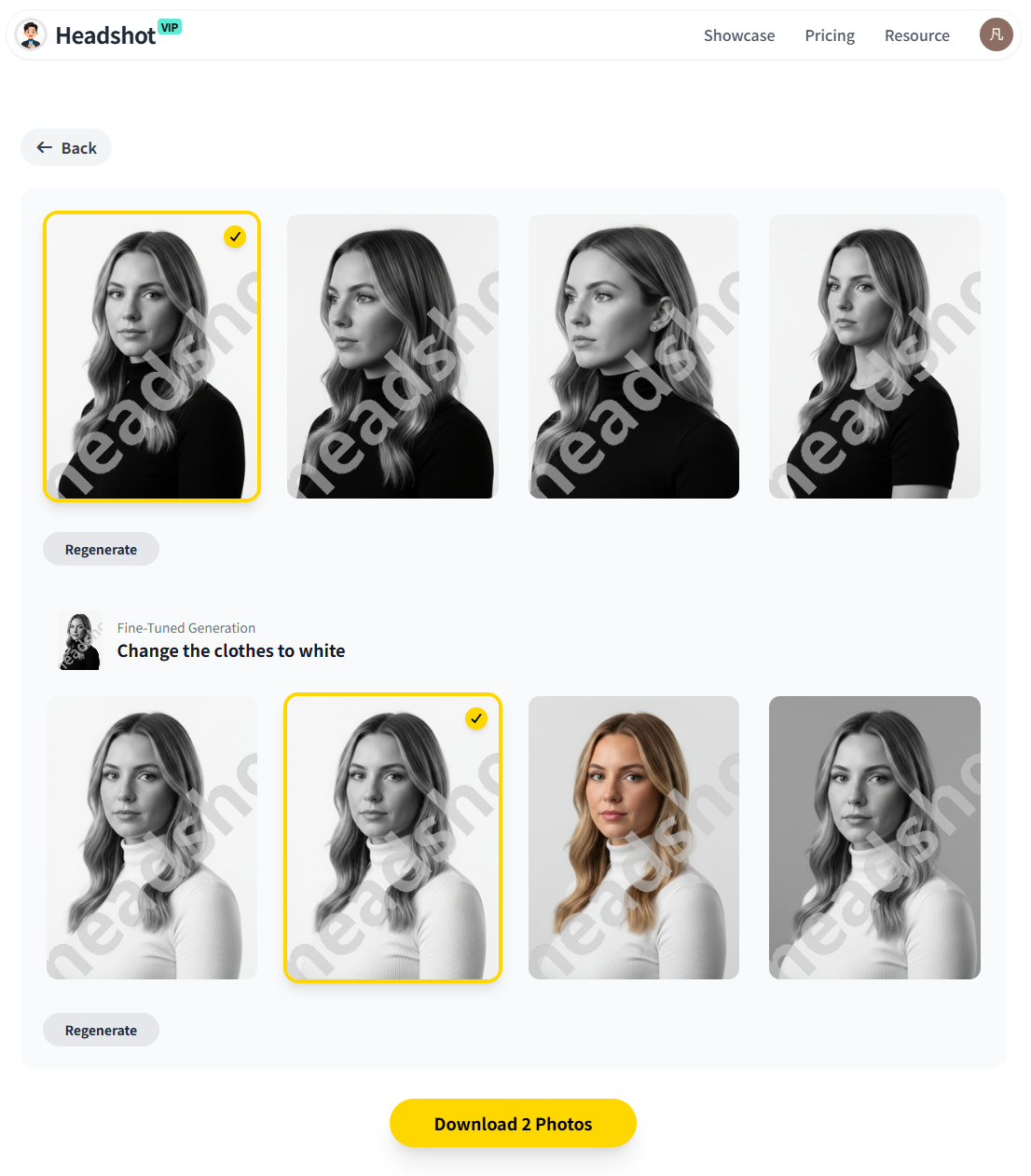
Alt: HeadshotVIP AI virtual headshot generator showing professional business results
Advantages of Using HeadshotVIP
✅ Business-first styles
Presets like LinkedIn, corporate, executive, and creative are built specifically for professional contexts, not just social avatars.✅ High-resolution output
Images are generated in resolutions suitable for LinkedIn, resumes, company websites, and even small-format print, avoiding the soft, low-res look many free generators produce.✅ Consistent branding for teams
Style-consistent batch generation keeps your whole team’s headshots aligned—same framing, similar backgrounds, and coherent lighting.✅ Fast, simple workflow
Upload → choose styles → generate → download. No need to juggle separate tools for upscaling, cropping, or reformatting.✅ Privacy-focused handling
HeadshotVIP emphasizes privacy-friendly processing: photos are used for generating your results, not for unrelated training or resale. You stay in control of your images.
Step 4: Method 2 – Using General AI Image & Design Tools
Maybe you’re already paying for a design suite (like Canva) or an all-purpose AI editor (similar to Aragon). You can still create an AI virtual headshot for business, but it’s more of a DIY workflow.
How the alternative approach usually works
- Upload a selfie into a general AI headshot generator or AI photo tool.
- Use built-in options for:
- Background replacement
- Lighting enhancement
- Clothing changer / retouching
- Optionally bring the result into a design tool to:
- Crop to 1:1 or 4:5 for LinkedIn
- Add subtle filters
- Add name/role overlays for team pages or slides
This approach can use:
- Design platforms with AI features (e.g., Canva’s AI headshot feature)
- AI photo editors with clothing, background, and lighting tools (similar to Aragon’s toolset)
Pros
Lower barrier for casual use
Good if you already live in those ecosystems and just want a “better-than-selfie” profile picture.Extra creative control
You can manually tweak backgrounds, colors, overlay graphics, and add design elements.
Cons (Where HeadshotVIP Stands Out)
Not always business-centric
Many presets are geared toward social media, creative or novelty looks (anime, vintage, “old money”) rather than clean corporate or executive imagery.More manual work to get consistency
Getting a full team to look cohesive often means a lot of manual editing and back-and-forth.Resolution and platform fit can vary
You might need additional tools to upscale or reformat images for LinkedIn, resumes, or print.
If you’re serious about using AI virtual headshots for business profiles—especially for hiring, sales, or investor-facing materials—a specialized tool like HeadshotVIP usually gives you better, more consistent results with less effort.
Step 5: Deploy Your AI Virtual Headshots Across Your Business Stack
Once you have a set of strong AI professional headshots, the real value comes from actually using them everywhere your brand shows up.
1. LinkedIn and professional networks
Profile photo
- Use a tighter, square crop focusing on head and shoulders
- Make sure eyes are clearly visible and bright
- Choose a neutral or slightly warm background
Banner and content
- Reuse your headshot as a secondary element in LinkedIn cover images, carousel posts, or personal brand graphics.
HeadshotVIP’s output is already optimized for LinkedIn-friendly ratios, so you usually don’t have to fight with weird crops.
2. CVs, resumes, and personal websites
Resumes/CVs
- Use a smaller, clean version in the top-left or top-right
- Keep file sizes reasonable (compressed but not blurry)
Portfolio and personal sites
- Place your most “you” headshot on the homepage hero or About section
- Reuse the same image in contact forms, lead magnets, and testimonial sections for consistent recognition
According to multiple recruiter surveys (like those cited in PetaPixel’s coverage of AI headshots), recruiters increasingly accept AI-enhanced headshots—as long as they look realistic and professional.
3. Company and team pages
For teams or startups:
- Use HeadshotVIP’s team / business plans to:
- Apply one style to everyone (same lighting, background, and framing)
- Export consistent crops for your team grid page
- Ensure new hires can be added later with the same look
This solves the classic problem where everyone’s photo looks like it came from a different decade or device.
4. Email signatures and tools
Email signatures
- Add a 80–120px square version of your headshot next to your name
- Keep file size small to avoid bloated emails
- Pair it with your title, company, and key links
Zoom/Teams/Google Meet
- Upload a slightly larger, centered crop for best visibility in circles
- Test how it looks in dark/light UI themes
If you use an email signature generator or a CRM, drop your new headshot in there as well so clients and leads see a consistent image everywhere.
Pro Tips to Make AI Virtual Headshots Look Professional (Not Fake)
Most AI headshot generators can produce something impressive. The difference between “wow, that looks like you” and “that’s clearly AI” comes down to details.
Tip 1: Keep edits within your real-world range
It’s tempting to go for heavy smoothing and dramatic changes. Don’t. For business:
- Stay close to your real age and features
- Avoid drastic reshaping of your face or body
- Think of it as good lighting, good lens, good day, not a new identity
If you walk into an interview or client meeting, you should look like your photo.
Tip 2: Align style with industry expectations
- Traditional industries (finance, law, medicine)
- Plain backgrounds, conservative attire, minimal jewelry
- Digital and creative fields (design, tech, media)
- You can be slightly more relaxed with clothing and backgrounds
- Founders/executives
- Confident but approachable expression, clean background, subtle depth of field
HeadshotVIP’s separate presets (corporate vs startup vs executive) make this easy—just pick the one that matches your market and role.
Tip 3: Respect privacy and ownership
Before you upload photos anywhere, check:
- Privacy policy: Are your images used only for your results, or also to train future models?
- Data retention: Can you request deletion? How long are files stored?
- Ownership: Do you have commercial rights to use your AI images on your site, ads, and marketing?
HeadshotVIP is positioned to be privacy‑friendly and business-focused: you keep rights to your images, and photos are handled specifically for your headshot generation, not resold.
For broader context on privacy best practices, you can also review independent guides about AI photo tools from reputable tech outlets like the Washington Post’s coverage of AI headshots and privacy considerations.
HeadshotVIP vs General AI Headshot Tools: Quick Comparison
Here’s a simplified comparison of using a general-purpose AI headshot generator vs a business-focused option like HeadshotVIP.
| Feature / Need | General Design / AI Tool (e.g. Canva-style) | General AI Headshot Platform (e.g. Aragon-style) | HeadshotVIP |
|---|---|---|---|
| Primary focus | Social content & graphics | Broad AI photos (dating, fun packs, etc.) | Business headshot creation |
| Business-specific style presets | Limited / generic | Mixed (business + novelty styles) | LinkedIn, corporate, startup, executive, creative |
| Team / company-wide consistency | Manual design work | Available, but mixed styles and use cases | Style-consistent batch generation for teams |
| Output resolution for professional use | Varies; may need upscaling | Generally good | High-res, optimized for LinkedIn, CVs, websites |
| Workflow simplicity | Multi-step across different tools | Simple, but often multi-purpose | Upload → choose business styles → download |
| Privacy emphasis | Varies by platform | Often strong, but data usage differs | Privacy-focused; business branding–oriented |
FAQ: Common Questions About AI Virtual Headshots for Business
Q1: Are AI virtual headshots accepted on LinkedIn and company sites?
A: Yes—as long as they look realistic and professional. Most recruiters and clients care far more about clarity, cleanliness, and appropriateness than whether you used a studio or AI. Use natural expressions, business-appropriate clothing, and avoid overly stylized or cartoonish looks. Tools like HeadshotVIP are designed specifically with business contexts in mind.
Q2: How many AI virtual headshots do I really need?
A: For most professionals, 3–6 strong options are enough:
- 1–2 for LinkedIn and job platforms
- 1 for your company site or portfolio
- 1 for email/CRM/Zoom
- 1–2 alternates for speaking, guest posts, or future rebrands
HeadshotVIP plans typically generate more than you need, so you can afford to be picky and choose the best.
Q3: Can I use AI headshots for printed materials like business cards?
A: Yes, as long as your generator provides sufficient resolution. Export at a high resolution (e.g., 4K output or at least 2048px on the short side) and let your designer or printer handle final sizing. HeadshotVIP’s higher tiers focus on high-res outputs suitable for both digital and small print applications like business cards and brochures.
Summary
Using an AI virtual headshot generator for business isn’t just about getting a nicer selfie. Done properly, it’s a full workflow:
- Clarify your business use cases and choose an appropriate style (corporate, executive, startup, creative).
- Prepare a set of well-lit, realistic selfies that represent your current look.
- Use a business-focused tool like HeadshotVIP to generate high-resolution, professional AI headshots in styles tailored for LinkedIn, resumes, websites, and teams.
- Deploy your new images across every professional touchpoint—LinkedIn, your site, email signatures, Zoom, and internal tools—for consistent branding.
- Keep edits realistic, respect industry norms, and choose platforms with strong privacy and ownership practices.
When you treat AI virtual headshots as a brand asset rather than a quick filter, you end up with a polished, consistent presence that supports your career, your business, and your team.
Try HeadshotVIP Now:
- Starter: $6.99 – perfect for individuals who need a solid set of AI professional headshots
- Professional: $9.99 – more styles and higher-resolution images for wider business use
Related Articles
- boost-ai-virtual-headshot-for-business-profiles-2025-tips
- how-to-use-ai-virtual-headshots-for-business-2025-guide
- ai-headshot-generation-privacy-protection-guide-2025
Current Date: 2026-02-05